Your car speaks.
CarvisorAI listens.
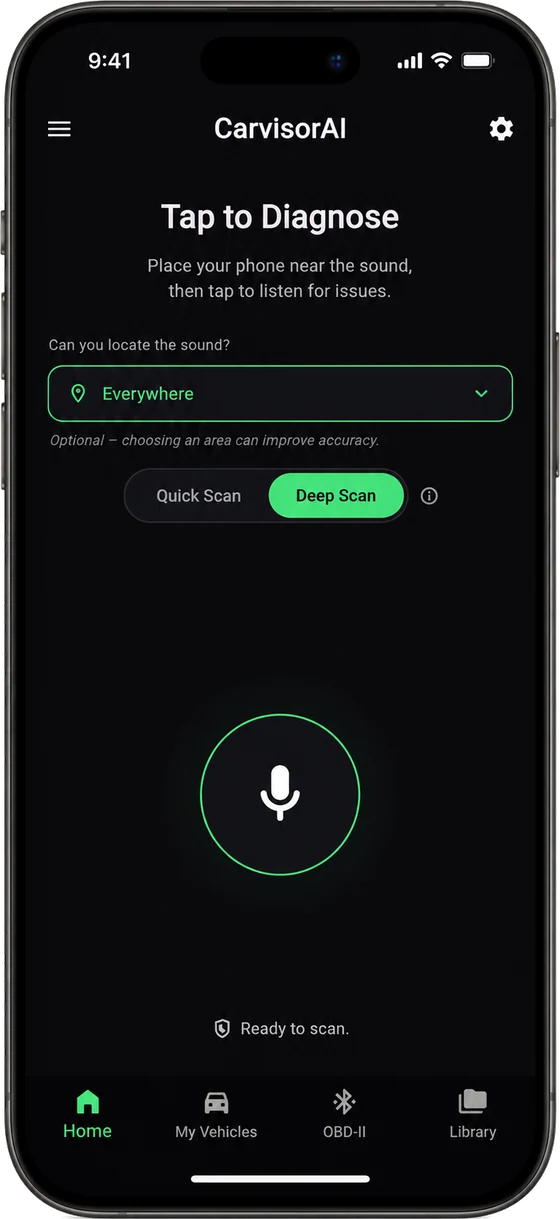
Hear a strange noise from your car? Hold up your phone near the sound and get an AI-assisted indication of what might be going on.

Featured in & supported by





Simple enough for drivers. Useful enough to start a smarter inspection.
CarvisorAI is not a replacement for a qualified mechanic. It is designed to help users understand suspicious sounds earlier and communicate the issue more clearly.
Record the sound
Open the app and record a short sound sample near the suspected area of the vehicle.
AI compares patterns
The prototype compares the recording against labeled vehicle sound patterns and contextual inputs.
Get a first indication
Receive a plain-language result with possible causes and suggested next steps.
Use CarvisorAI when a sound feels off.
From cold starts to brake squeals, CarvisorAI helps drivers capture the right sound and get an AI-assisted first indication before visiting a mechanic.

For everyday drivers
A quick scan after hearing a strange noise before calling a mechanic or arranging a service visit.
Get close to the source
Capture clearer audio while stationary, safely parked, and close to wherever the sound is coming from.
One app for drivers and for workshops.
Drivers get a first indication before they visit a mechanic. Mechanics record the cars they work on and confirm what was actually wrong.
Check a strange sound in seconds.
- Quick Scan, or Deep Scan with a few questions about what the car was doing
- A first indication with a confidence score and urgency
- Your cars and past scans in one place
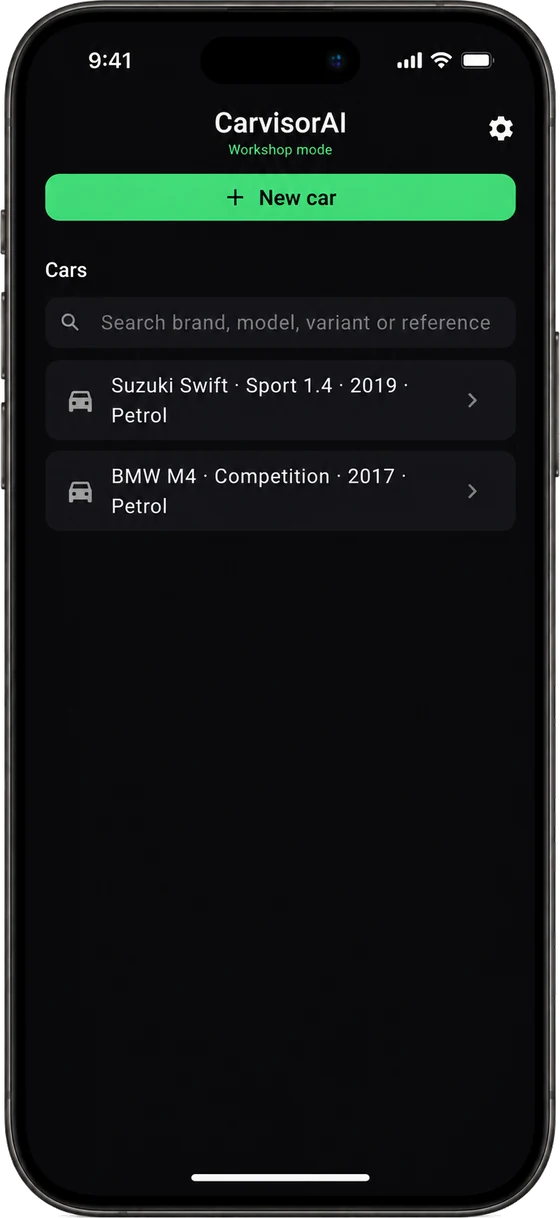
Workshop mode for mechanics.
- Add a customer's car without names or plates
- Record, give your own diagnosis, then see what the model says
- Keep a history per car and correct a diagnosis later
Built around practical vehicle diagnosis workflows.
Acoustic fault detection
Record vehicle sounds and receive AI-assisted pattern matching against known issue categories.
Vehicle history context
Add your car's make, model, engine and fuel so results are read in the right context.
Vehicle health record
Record how your car sounds when it's fine, and play it next to any later scan to hear what changed.
Learns from confirmed cases
Partner mechanics record cars and confirm what was actually wrong. Every confirmed case goes back into training, so the next result is better.
"Not sure" beats a guess
When the sound isn't clear enough, the app says so instead of guessing, and tells you how to record again.
Clear next steps
Results are written in simple language so users know what to inspect or ask a mechanic.
Start free. Upgrade when you need more.
Every plan includes sound analysis, automatic voice removal and an honest "not sure" when the app can't tell. Prices will be announced at launch.
- ✓ Limited monthly scans
- ✓ Quick Scan
- ✓ 1 vehicle
- ✓ A first indication of the likely area, marked strong or weak
- ✓ Says "not sure" instead of guessing
- ✓ Voices removed automatically
- ✓ Vehicle health record, free during early access
- ✓ Last 3 scans
- ✓ More scans every month
- ✓ Deep Scan with context questions
- ✓ Up to 3 vehicles
- ✓ Full scan history
- ✓ Vehicle health record
- ✓ Everything in Free
- ✓ Workshop mode
- ✓ No limit on cars, with search & reference
- ✓ Your own diagnosis on every recording
- ✓ History per car, editable later
- ✓ Says "not sure" instead of guessing; voices removed automatically
- ✓ Partner pricing
| Feature | Free | Plus |
|---|---|---|
| Monthly scans | Limited | More |
| Quick Scan | ✓ | ✓ |
| Deep Scan | — | ✓ |
| Vehicles | 1 | Up to 3 |
| Strong / weak indication, or an honest "not sure" | ✓ | ✓ |
| Voices removed automatically | ✓ | ✓ |
| Vehicle health record | Early access | ✓ |
| Scan history | Last 3 scans | Full history |
| Coming later | ||
| OBD-II integration | — | Planned |
| Mechanic-ready report | — | Planned |
| Repair cost estimate | — | Planned |
Running a fleet? Contact us.
Plans are subject to change without prior notice.
Questions, answered
Can't find what you're looking for? Reach out below.
Do I need any extra hardware?
No. CarvisorAI works with your phone's built-in microphone. OBD-II support is on our roadmap.
How accurate is the diagnosis?
CarvisorAI gives a first indication of the likely area, not a guaranteed diagnosis. Each result says whether the indication is strong or weak, and the app says "not sure" when it can't tell rather than guessing. It improves as it learns from recordings users choose to contribute and from cases confirmed by partner workshops.
Is CarvisorAI a replacement for a mechanic?
No — think of it as the step before the mechanic. CarvisorAI helps you understand what might be wrong and how urgent it could be, so you can describe the problem clearly when you get there.
Which cars are supported?
CarvisorAI works across makes and models. Results are more reliable for widely driven cars and improve as more recordings are contributed.
What happens to my recordings?
Your recording is used to give you a result. It is stored to help train the model only if you allow it, and you can change that in Settings at any time.
I run a workshop. Can I use CarvisorAI?
Yes. Workshop mode lets mechanics record the cars they work on, add their own diagnosis and keep a history per car. We are onboarding partner workshops now — contact us.
Can I switch plans later?
Yes. When paid plans launch, you'll be able to upgrade, downgrade or cancel at any time, and your scan history and vehicles stay with your account.
What if I accidentally record someone's voice?
Our server detects speech and cuts it out before anything is saved. The diagnosis uses only the engine sound, and only that sound is stored, and only if you chose to contribute. Voices never reach our storage.
Can I use it while driving?
Never operate the app while you are driving. Some sounds only appear when the car is moving: record those only with a passenger holding the phone.
Contact us
Questions, partnerships, or a workshop that wants to work with us? Send a message and we'll get back to you. Looking for early access? Join the waitlist.